
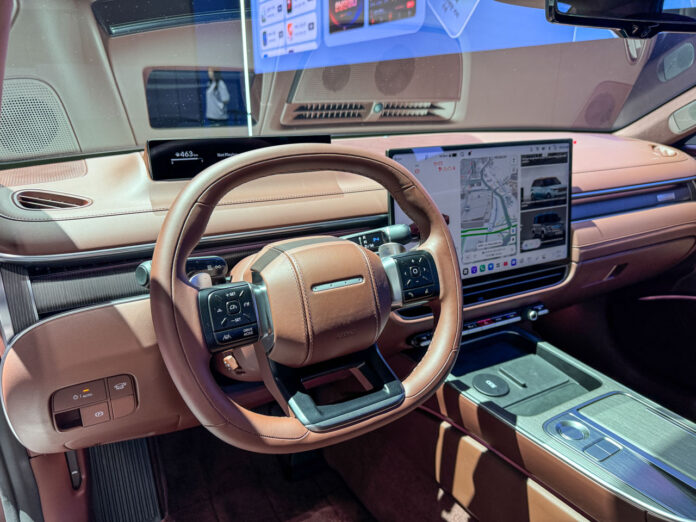
Pleos Connect from Hyundai Motor Group (HMG) is not just a new infotainment screen. After experiencing it in the new Hyundai Grandeur cutaway in Korea, I see it more as a complete digital cockpit setup that brings together the instrument cluster, central touchscreen, vehicle controls, apps, navigation, and voice assistant into one software-led interface.


The setup immediately felt different from HMG’s current global interiors. There is a slim display directly in front of the driver and a large central touchscreen on the dashboard. Together, these two screens form the core of Pleos Connect.
The slim display works like a compact instrument cluster. It keeps important driving information such as speed, media, and turn-by-turn directions directly in the driver’s line of sight.
This is important because the central display is very large and feature-rich, and Hyundai clearly wants the driver to look ahead for essential information instead of relying only on the main screen.

The central touchscreen in the Grandeur looked big, but it did not feel oversized in a sedan of this size. HMG has developed 12.9-inch, 14.6-inch, and 17-inch versions of the display depending on the model.
The Grandeur uses the 17-inch version, and it suits the width and height of the dashboard well. It sits neatly and gives the dashboard a modern, tablet-like layout. In smaller cars such as the Elantra and Ioniq 3, Hyundai is offering the smaller versions.
What I liked is that Pleos Connect does not completely remove physical controls. The vehicles still have temperature dials and piano-style switches below the central display. The steering wheel also had physical buttons. That makes the system feel more practical than a pure touchscreen layout.
The HVAC controls are available on the screen as well, but the physical controls reduce the need to dig through menus for every basic adjustment.

The central screen can be divided into multiple sections. In the demo, I could see vehicle information on the left, navigation in the middle, and media on the right. This makes Pleos Connect feel more like a cockpit interface than a conventional infotainment unit.
The left section shows information such as speed, distance, temperature, warning lights, and vehicle graphics. It looked almost like an extension of the instrument cluster. This area can also show vehicle alerts, open-door warnings, or other status information while driving.
The middle part of the screen is for navigation. The right section can be used for media, Bluetooth audio, radio, Apple CarPlay, apps, and even browsing TopElectricSUV.com! This three-part setup is useful because it lets the driver or passenger keep several functions visible at the same time.
I also noticed that app windows can be adjusted. For example, an app such as YouTube can take up a larger part of the screen. It is not a fully free desktop-style layout, but there is enough flexibility to make the interface feel modern and less rigid.

The clearest impression I got from Pleos Connect is that it behaves like a large Android tablet integrated into the car. The top-right area has familiar indicators for time, Bluetooth, Wi-Fi, and signal strength. The bottom bar works like a dock, with shortcuts for apps and frequently used functions.
The system I used had apps such as YouTube, Spotify, NAVER Maps, radio, browser, and other Korean services. I even opened the browser, which reinforced the tablet-like feeling. At the same time, it is not just a screen running apps. It is connected to the vehicle, the driver display, navigation, climate system, and vehicle settings.
This is where Pleos Connect feels more serious than a simple infotainment upgrade. It is HMG’s move toward a software-defined cockpit.

Gleo AI is another major part of the system. The version I tried did not have English support active, but the Korean demo worked smoothly. After saying “Hey Gleo,” the user can ask natural-language questions or give commands.
It can set navigation to a destination, call a family member, read a text message, turn on the radio, change the song, pause music, adjust the AC, open a window, change ambient lighting, and answer vehicle-related questions. It can also explain warning lights or provide information such as tire pressure.
What makes it interesting is that it does not feel limited to fixed commands. You can ask where to adjust the brightness, how to make the text larger, what time it is in New York, or even ask for travel recommendations like in a normal conversation. That makes it feel closer to a companion in the passenger seat than an old-school voice control system.
HMG aims to equip around 20 million vehicles across brands with this cockpit system by 2030, which means all future Hyundai, Kia, and Genesis vehicles will run Pleos Connect.

From the consumer standpoint, the main challenge will be distraction. The screen can do a lot, and the interface is visually rich.
After trying it briefly, I would not describe Pleos Connect as just infotainment. It feels like HMG’s next digital cockpit, with the instrument cluster, central display, apps, vehicle controls, and AI assistant finally working as one system.

An automobile engineer by training, I’ve analyzed the global car market since 2005, with a keen focus on EVs since 2008. My journey in online automotive publishing spans 17 years, during which I have reviewed cutting-edge automotive technologies and interviewed leading global CEOs and vehicle developers.

